
Table of Contents
Most automation programs stall at 60%. Not because the bots failed. This is because the architecture was never designed to support further progress.
The fix isn't more automation. It's a better sequence.
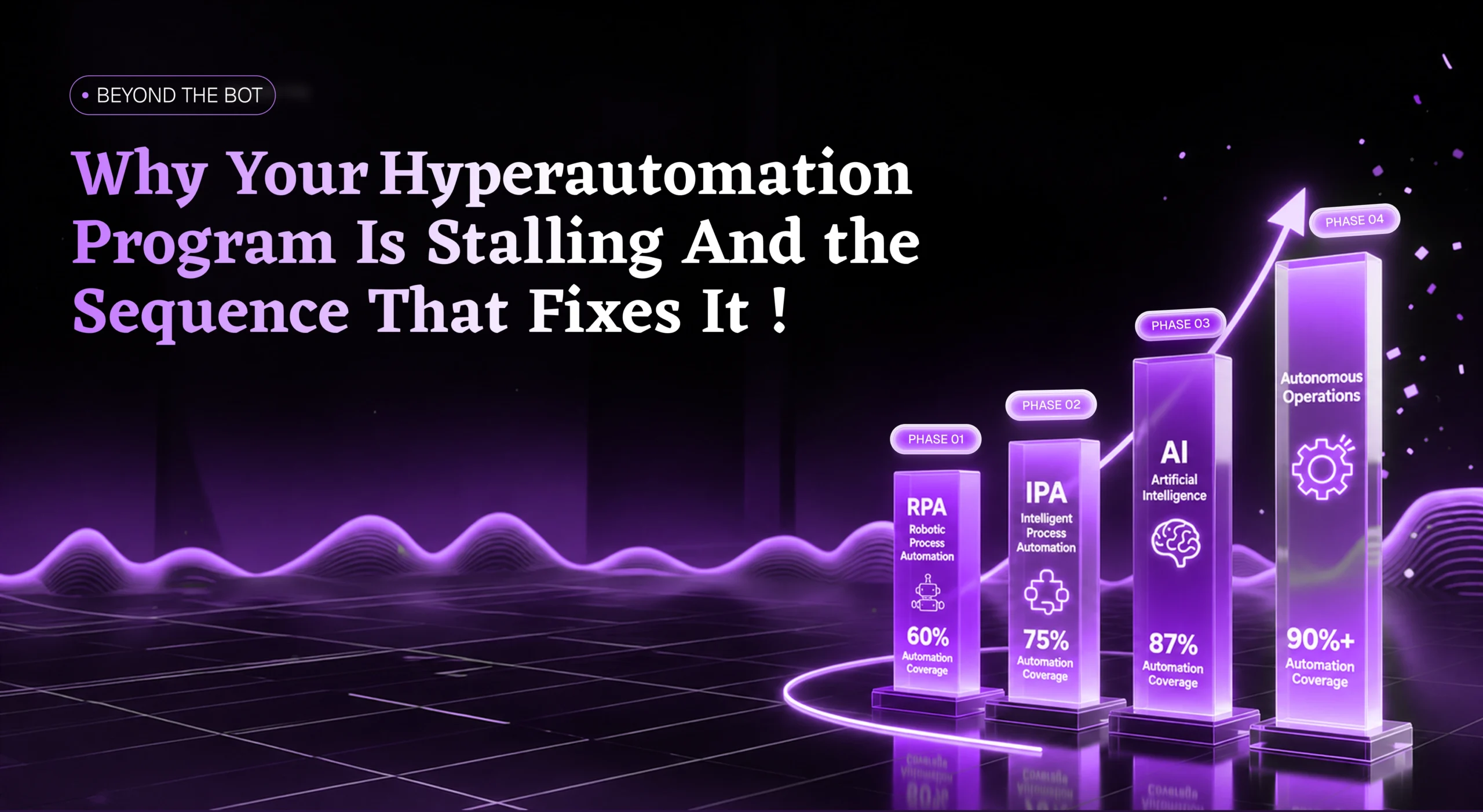
This blog maps the four phases that take you from 60% to 90%+ — without rebuilding what you have.
Introduction
You bought the platform, deployed the bots, and ran the sprints. You celebrated the wins, reported the numbers upward, and built the business case around what the program delivered.
Then the numbers stopped moving.
Every automation leader we've worked with has reached this point. The dashboards are green, the bots are running, and a CFO is asking why the business case hasn't materialized. The instinct is always the same: more bots, more budget, more bandwidth, and a harder push on what's already in place.
That instinct is wrong.
Stalling at 60% isn't a delivery failure. It isn't a platform problem, and it isn't a headcount issue. It's an architectural one. The ceiling exists because of how the program was built, not because of how hard the team is working.
The structure that got you to 60% is the same one that's holding you there.
The solution isn't more automation. It's better-sequenced automation.
But to understand why the sequence works, you need to understand why the ceiling exists in the first place.
Root Cause
Why Your RPA Stalled at 60%
The architecture of RPA is straightforward: it executes defined rules at machine speed. If the field contains a match, the bot routes the process forward. If it doesn't, the bot stops.
That model works perfectly for 60% of your processes, because 60% of your processes are rule-based and predictable.
Every exception that falls outside your defined rules routes back to a human: vendor invoices that don't match purchase orders, claims carrying conflicting data across three systems, and the approvals that require someone to make a judgement call before the process can continue.
Over time, your operations team becomes a specialized exception-handling function, absorbing the load that automation never cleared.
Here's what that looks like in practice: a single enterprise workflow generating 52 hours of manual exception handling every day. Not because the bots are failing or the team is underperforming.
That's disguised overtime.
Problem
The architecture has a ceiling. Rule-based systems execute what their rules define and stop when a process falls outside them.
Impact
A single enterprise workflow generating 52 hours of manual exception handling every day, with no structural fix in sight.
Hidden Cost
The operations team absorbs the same hours under a different task name, invisible on dashboards but visible in headcount.
Because the architecture has a structural ceiling.
The natural response is to tighten the rules, add more exception logic, and push harder on what's already there. That approach moves the ceiling by a few percentage points, but it doesn't change the fundamental constraint.
We've seen it consistently: executives look at bot utilization rates and call the program a success, while the operations team knows the actual manual workload hasn't decreased. It's simply shifted from standard processing to exception clearing, with the same headcount absorbing the same hours under a different task name.
The 60% ceiling isn't an execution problem. It's a design consequence. Rule-based automation can only go as far as your rules allow, and when a process hits something outside those rules, the bot stops, and the queue grows.
Breaking through doesn't require rebuilding your automation program. It requires adding a layer of intelligence that handles what rules cannot: routing ambiguous inputs, recognizing patterns across exception history, and keeping processes moving without routing everything back to a human queue.
That layer doesn't require replacing your existing automation. It builds on top of it.
The first layer doesn't replace your bots. It upgrades them.
Layer 01
Layer 1: Intelligent Process Automation - The Business Logic Your Bots Were Never Given
The first question most teams ask at 60% is whether they need to replace their existing automation with something more capable. No. Never. The bots are performing exactly as their design intended.
The problem isn't the tool. It's a missing layer, one that was never part of the original design specification, and without it, every exception your automation can't handle routes back to a human by default.
RPA executes rules, but it doesn't interpret them. When a process hits an input that falls outside the defined rule set, the bot has no framework for making a decision.
It simply stops. Intelligent Process Automation adds that missing framework, the layer of business logic that handles the cases bots can't resolve and humans shouldn't have to clear.
IPA doesn't replace your bots. It extends what they can do by introducing capabilities that rule-based automation lacks: intelligent routing based on context rather than fixed conditions, conditional branching that handles variation without failing, and structured exception resolution that keeps processes moving instead of handing everything back to a queue.
Consider how this plays out in an accounts payable approval workflow.
Robotic Process Automation
IPA
Intelligent Process Automation
The bot didn't fail. It handed off to a smarter layer, and the process continued.
That shift moves your automation coverage from 60% to 75%. It doesn't change the processes your bots already handle well. It recovers the 15% of volume that was leaking into manual queues.
The difference isn't more automation. It's automation that applies the business logic your team already uses, consistently, at scale.
IPA captures everything your team can articulate. But some patterns don't live in anyone's head.
Layer 02
Layer 2: AI Workflow Automation - When the Rules Run Out and the Patterns Begin
IPA took you to 75% by capturing every rule your team could articulate: the routing logic, the defined rules, and the structured exception paths they've refined over time. The remaining 25% resists this approach because the logic that governs it has never been documented anywhere.
It lives in patterns.
Patterns your best people built from years of handling the exceptions that fell outside every process document ever written. You can't encode that into a rule set. But you can learn it from data.
Here's what most organizations miss: the exceptions your team has resolved in the last 12 to 24 months constitute a valuable training dataset. Every input, every decision, and every outcome is governed. This is the complete record of how your team handled situations that the rules couldn’t govern. AI workflow automation uses that record to recognize patterns at a scale no team can match, then applies those patterns forward without a queue.
Here's what this looks like on claims processing workflows:
Intelligent Process Automation
AI
AI Workflow Automation Layer
That shift moves coverage from 75% to 87%, and your team's role evolves alongside it. Instead of clearing exception queues, they review outcomes, surface edge cases the model hasn't encountered before, and continuously sharpen the system's judgement.
87% is not the ceiling. It's the launch pad.
Layer 03
Layer 3: Autonomous Workflow Automation - The Final Shift
IPA took you to 75% by capturing every rule your team could articulate: the routing logic, the defined rules, and the structured exception paths they've refined over time. The remaining 25% resists this approach because the logic that governs it has never been documented anywhere.
It lives in patterns.
Patterns your best people built from years of handling the exceptions that fell outside every process document ever written. You can't encode that into a rule set. But you can learn it from data.
Here's what most organizations miss: the exceptions your team has resolved in the last 12 to 24 months constitute a valuable training dataset. Every input, every decision, and every outcome is governed. This is the complete record of how your team handled situations that the rules couldn’t govern. AI workflow automation uses that record to recognize patterns at a scale no team can match, then applies those patterns forward without a queue.
Here's what this looks like on claims processing workflows:
Confidence Thresholds
Define when the system acts and when it escalates.
Escalation Paths
Route edge cases to the right human at the right time.
Audit Trails
Log every decision that the system makes.
Review Cadences
Keep your team in the loop without putting them back in the queue.
The difference before and after Layer 3 is not whether humans are present in the process. Before, your team cleared exceptions; after, the system clears them, and your team governs the model that decides how. Coverage moves from 87% to 90%+, and the operations function shifts from reactive clearing to active oversight.
Autonomy at this layer doesn't remove human judgement from the program. It reserves human judgement for the decisions that actually require it.
RPA Coverage Ceiling
Daily Manual Exception Load
Coverage with Full Sequence
Three layers. Most leaders assume they've completed two of them.
Maturity Gap
Why Most Leaders Overestimate Their Automation Maturity
Most leaders who walk into an automation review believe their program sits at Layer 2. Most of them are operating at Layer 1, and some haven't fully stabilized past the initial deployment. The gap between perception and reality isn't ignorance; it's the measurement system the program uses to report progress.
Bot utilization rates tell you how much your automation is running, not whether it's producing the outcomes the business case required. Exceptions cleared per day tell you volume, not what percentage still requires a human hand. The dashboards measure activity; they don't measure effectiveness. And the difference between the two is where most programs stall.
Here's what we’ve consistently seen. Three signals that a program is a phase behind where leadership thinks it is:
Utilization Without Outcomes
Bots are running at high utilization, but exception queues haven’t shrunk.
Automation Without Efficiency
Automation went live across five processes, but headcount didn't change.
Coverage Without ROI
The ROI deck looks clean, but the operations team is exhausted.
None of these are failure signals; they're diagnostic signals. They tell you exactly which layer is missing from the sequence.
A program where bots run but exceptions stay high hasn't added IPA. A program where headcount holds despite automation hasn't fixed the underlying process. A program where ROI is flat despite coverage growth hasn't reached Layer 2.
Completing a phase and passing through a phase are not the same thing.
The roadmap only works if you start from where you actually are.
The Sequence
The Hyperautomation Roadmap: Why Sequence Is the Architecture, Not a Preference
Most automation programs carry the right tools in the wrong sequence. That's not a small problem. It's the reason programs stall, restart, and lose budget confidence before they ever reach autonomous workflows.
Here's what we call the failure cascade.
Skip Phase 1 (Stabilize)
You automate broken processes. Your bots inherit the noise. IPA can't route what the process hasn't defined.
Skip Phase 2 (Add IPA)
Your AI layer lacks exception data to learn from. You've deployed a model with nothing to train on.
Skip Phase 3 (Deploy AI)
You're asking autonomous workflows to operate on a foundation that isn't ready. The exposure isn't theoretical. It's operational.
The sequence isn't a preference. It's the architecture.
Phase 1: Stabilize (Months 1-2). Before any bot touches a process, it needs to run cleanly without one. This phase involves removing exceptions, eliminating variation, and defining one clear path the automation can follow consistently. Most teams treat it as delay; it is foundation.
Phase 2: Add IPA (Months 2-4). With stable processes in place, IPA adds the routing intelligence that extends automation beyond rule-based coverage. Conditional branching, contextual decision-making, and structured exception resolution bring coverage from 60% to 75% by recovering volume that rule-based automation was never designed to handle.
Phase 3: Deploy AI (Months 4-6). The exception history your team generated in Phase 2 becomes the training foundation for the AI layer. Patterns replace rules where rules run out, and the system begins resolving exceptions that no one has explicitly programmed it to handle. Coverage moves from 75% to 87%.
Phase 4: Enable Autonomous Workflows (Month 6+). With a stable process, an intelligent routing layer, and a trained AI model in place, the governance architecture activates. The system operates, escalates appropriately, and logs every decision. Your team governs outcomes rather than clearing volume, and coverage reaches 90%+.
Each phase creates the condition the next phase requires. You don't move forward because the calendar says so. You move forward because the data does. Tool choice follows phase readiness. Not the other way around.
Automation Layer Progression
Most automation programs carry the right tools in the wrong sequence. That's not a small problem. It's the reason programs stall, restart, and lose budget confidence before they ever reach autonomous workflows.
| Layer | Technology | Coverage | What It Adds |
|---|---|---|---|
| Foundation | Robotic Process Automation (RPA) | 60% | Rule-based execution at scale |
| Layer 01 | Intelligent Process Automation (IPA) | 75% | Business logic and exception routing |
| Layer 02 | AI Workflow Automation | 87% | Pattern recognition from exception history |
| Layer 03 | Autonomous Workflows | 90%+ | Self-governing workflows with governance rails |
We know this works because we ran it first
Before recommending the sequence to clients, we implemented it in our own CRM, Hi Doctor.
Phase 1: We stabilized the RPA estate and mapped the full exception landscape: distributor code mismatches, territory boundary disputes, product category gaps, and submission timing flags. Each one documented, not assumed. That mapping became the direct input for Phase 2.
Phase 2: We captured the routing logic that already existed inside the organization in the heads of regional managers making the right call manually every day and made it executable at scale. Exception queues cleared through logic, not headcount. Coverage moved to 75%.
Phase 3: The structured exception data Phase 2 generated as a real training foundation. Anomaly detection calibrated to actual secondary sales patterns. Coverage moved to 87%.
Phase 4: Autonomous reconciliation activated within the governance framework the previous phases had built. The ops team shifted from clearing queues to governing outcomes. Coverage reached 90%+.
The tools were available at every stage. What the sequence delivered was a foundation each layer could actually build on. That discipline is also what determines when tool decisions are ready to be made.
Tool Choice by Phase: When to Decide and What to Evaluate
The automation industry structures the buying conversation backwards. Platform selection happens early, often before the exception landscape is mapped or the readiness criteria for each phase are confirmed. A capable platform deployed on an unprepared foundation is still a failed program.
Phase 1 requires no new tooling. The work is governance, documentation, and KPI definition.
Phase 2 tooling is chosen based on the exception categories Phase 1 documented. UiPath AI Center, Automation Anywhere IQ Bot, or purpose-built IPA middleware; the choice follows routing logic complexity, not vendor positioning.
Phase 3 platform selection is driven by the structure, volume, and format of exception data Phase 2 generated. Document processing capability, confidence calibration, and model retraining cycles only become meaningful once you know what your exception history actually looks like.
Phase 4 orchestration tooling and audit infrastructure are shaped by the signal quality the AI layer is actually producing. Designing autonomous workflows before that layer is stable is designing for a system that doesn't exist yet.
Tool choice follows phase readiness. Not the other way around.
Knowing the roadmap is not the same as knowing where you are on it.
Self-Assessment
Three Questions That Reveal Your Hyperautomation Phase Gap
Most programs don't need more automation. They need a clearer read on where they actually are.
Three diagnostic questions reveal where your program sits:
Is your automation live, but headcount hasn't changed?
The process beneath the automation hasn't stabilized. Phase 1 isn't complete.
Are your bots running, but exception queues haven't moved?
You're at Phase 1. IPA is the next layer.
Has your AI layer gone live, but coverage is flat?
The exception data feeding the model isn't structured enough. Phase 2 needs strengthening before Phase 3 can produce results.
Each answer maps to a specific phase gap, and each gap has a clear next step.
That's what our hyperautomation assessment delivers. In 60 minutes, we map your program against the four-phase sequence, identify where the gap sits, and hand you a phased action plan you can execute immediately.
Not a proposal, not a discovery engagement: a plan built on where your program actually stands today.
This is how SwaaS works with automation leaders who've stalled: we start where you are, not where the sales deck says you should be.
Ready to find your phase gap?
60 minutes. Evidence-based diagnosis. A phased action plan tailored to your program.